Best Mechanical Keyboard for Home Office Under $100 (2026)
Editor’s Top Pick
Keychron K2 — Best Mechanical Keyboard for Home Office

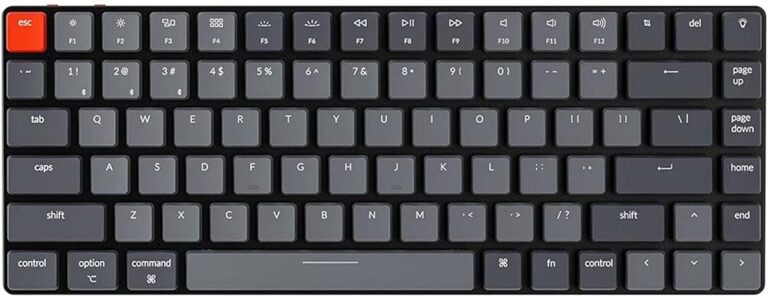
The Keychron K2 is the best mechanical keyboard for home office users who want wireless connectivity, Mac/Windows compatibility, hot-swappable switches, and premium build quality — all under $90. Its 75% compact layout retains function keys and arrow keys while taking up significantly less desk space than a full-size keyboard.

Check Price on Amazon
KeyboardLayoutWirelessSwitchesPriceLink
Keychron K2TOP PICK75%Yes (BT)Hot-swap~$85Amazon
Logitech MX Keys100%Yes (BT)Scissor~$110Amazon
Royal Kludge RK8475%Yes (BT)Hot-swap~$45Amazon
Anne Pro 260%Yes (BT)Fixed~$75Amazon
Keychron K665%Yes (BT)Hot-swap~$75Amazon

Are Mechanical Keyboards Worth It for Work?

If you type for several hours a day, a mechanical keyboard is one of the best investments for comfort and productivity. The tactile feedback of a mechanical switch reduces typing errors (you know when a keypress has registered), and the satisfying resistance improves typing rhythm over time. Most heavy typists report faster typing speeds and less finger fatigue after switching from membrane keyboards.

For home offices specifically, the noise concern disappears — you’re not disturbing coworkers. This opens up the full range of switch options, from clicky blue switches to quieter red linears, depending on your preference.

1. Keychron K2 — Best Overall

Keychron K2Check Price on Amazon

Keychron has become the default recommendation for home office mechanical keyboards, and the K2 is the most versatile model in their lineup. The 75% layout (87 keys) keeps the function row and arrow cluster while shrinking the overall footprint — ideal for a clean desk setup. Wireless via Bluetooth 5.1 with a 4000mAh battery (lasting weeks between charges), plus wired USB-C mode.

The hot-swappable PCB means you can swap switches without soldering — try Gateron Browns, then switch to Reds or Blues based on your preference. Available in RGB or white-backlit versions. Mac and Windows keycaps included. Check price on Amazon →

2. Royal Kludge RK84 — Best Budget Pick

Royal Kludge RK84Check Price on Amazon

At ~$45, the RK84 delivers hot-swappable mechanical switches and Bluetooth 5.0 at a price point that should be impossible. The 75% layout mirrors the Keychron K2’s key arrangement. Build quality uses a plastic frame (vs. Keychron’s aluminum), but the typing experience is genuinely competitive.

The RK84 has become a cult favorite in the budget mechanical keyboard community. If you want to try mechanical keyboards without committing $85, this is the entry point. Available with Red (linear), Brown (tactile), or Blue (clicky) switches. Check price on Amazon →

3. Keychron K6 — Best 65% Layout

Keychron K6Check Price on Amazon

The K6 takes the Keychron formula and shrinks it to 65% — dropping the function row but retaining arrow keys. This is ideal for users with compact desk setups or those who want maximum mouse movement space. The aluminum frame, hot-swap PCB, and Bluetooth tri-device connectivity match the K2 spec at a slightly lower price.

If you use a separate shortcut tool (like Stream Deck) for function keys, or simply never use F-keys, the K6’s smaller footprint is a meaningful desk organization win. Check price on Amazon →

4. Anne Pro 2 — Best 60% Keyboard

Anne Pro 2Check Price on Amazon

The Anne Pro 2 is the 60% keyboard of choice for minimalists — no function row, no arrow keys in the traditional sense (accessed via layers), and a compact footprint that leaves your entire desk free for mouse movement. Bluetooth 4.0 wireless with USB-C charging, and the customizable per-key RGB adds to the premium feel.

The 60% layout has a learning curve — you’ll use Fn+combinations frequently at first. Most experienced users find they adapt within a week and never go back. Not recommended for spreadsheet-heavy work where arrow keys and function keys are constantly in use. Check price on Amazon →

Choosing the Right Switch Type

Linear (Red/Black): Smooth keypress with no tactile bump. Preferred by gamers and fast typists who like a consistent, uninterrupted keystroke. Quieter than clicky switches. Gateron Reds are the most popular for home office use.

Tactile (Brown/Clear): A subtle bump at the actuation point gives you tactile confirmation that the key registered. No audible click. The most popular switch for office/home office use — the best of both worlds. Gateron or Cherry Browns are the standard recommendation.

Clicky (Blue/Green): Tactile bump plus an audible click. The most satisfying typing experience for many users, but the loudest option. Best for home offices where you’re not on calls all day. The iconic “keyboard sound” from movies is usually a Blue switch.

Frequently Asked Questions

What is the best mechanical keyboard for working from home?+

The Keychron K2 is the best mechanical keyboard for home office use. Its 75% layout keeps all the keys you actually need, it connects wirelessly to up to 3 devices via Bluetooth, and the hot-swappable switches let you customize the typing feel without soldering. At ~$85, it’s excellent value for a premium typing experience.

Is a mechanical keyboard loud? Will it bother people on calls?+

Clicky switches (Blues) are noticeably loud and will be picked up by most microphones. However, linear (Red) and tactile (Brown) switches are much quieter — often comparable to a quality membrane keyboard. If you’re on frequent calls, choose a keyboard with Brown or Red switches and a dynamic microphone with noise cancellation.

What keyboard layout is best for home office work?+

75% is the ideal layout for most home office users. It retains the function row (essential for software shortcuts) and arrow keys, while reducing the keyboard footprint by removing the numpad. Full-size keyboards are worth it only if you do significant data entry. 60-65% layouts require layer usage and have a learning curve.

How long do mechanical keyboards last?+

Quality mechanical keyboards are rated for 50-100 million keystrokes per switch. At 8 hours/day of typing, you’d need decades to wear out the switches. The keyboard physically outlasts most other desk peripherals. This durability makes the initial investment particularly good value over time.

Can I use a mechanical keyboard with a Mac?+

Yes. The Keychron K2 includes both Mac and Windows keycap sets and has a toggle switch for Mac/Windows mode. The Logitech MX Keys supports macOS natively. Most mechanical keyboards work with Mac via USB-C or Bluetooth without any configuration.

AC
Reviewed by
Alexis Camue

Home office enthusiast and founder of Home Office Nation. I’ve spent years optimizing my own workspace and analyze thousands of reviews to help you build a better home office without wasting money.

Home Office Nation · Updated May 2026

💡 Related Articles