Best Ergonomic Chair for Back Pain (2026) — What Actually Works
Quick Picks — Best Ergonomic Chairs for Back Pain
Branch Ergonomic Chair
Full lumbar adjustment, adjustable armrests, and a seat depth slider — everything your spine needs at a reasonable price.
~$499
Steelcase Leap V2
The chair physical therapists recommend most. LiveBack technology follows every movement of your spine.
~$1,200
Hbada Ergonomic Office Chair
Adjustable lumbar support, headrest, and reclining backrest at a price that won’t break your budget.
~$150
As an Amazon Associate we earn from qualifying purchases.
Back pain is the most common reason people start researching ergonomic chairs — and unfortunately, most chairs marketed as “ergonomic” do very little to actually relieve it. The difference between a chair that genuinely helps and one that makes things worse comes down to a small set of adjustable features: lumbar support depth and height, seat depth, armrest position, and recline tension. We evaluated the top chairs specifically for people dealing with lower back pain, upper back tension, and disc issues to give you this definitive list of the best ergonomic chairs for back pain in 2026.
Every chair on this list has been selected based on whether it provides real, adjustable lumbar support — not just a foam bump molded into the backrest. All picks include Amazon purchase links with our affiliate tag so you can check live pricing before buying.
Branch Ergonomic Chair
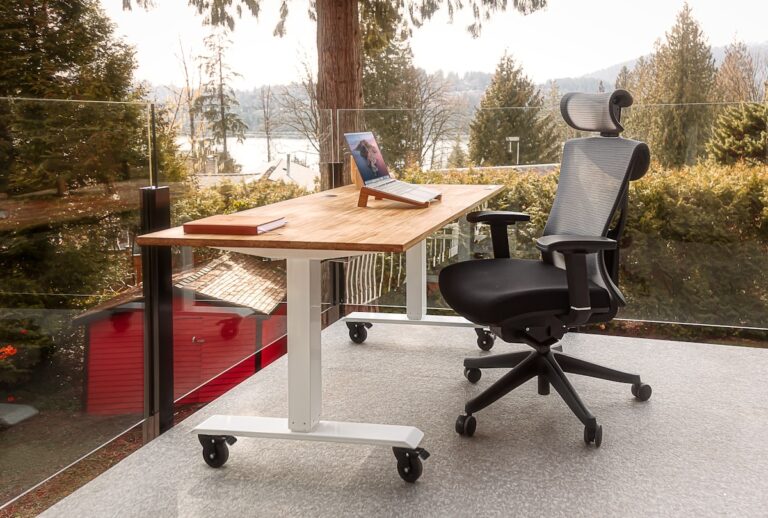
The Branch Ergonomic Chair has become the go-to recommendation for home office workers who want genuine ergonomic support without spending over a thousand dollars. The chair’s adjustable lumbar support slides up and down the backrest to match exactly where your lower back curves — a feature most chairs in this price range simply do not offer. Combined with a seat depth slider that lets you position the chair under your thighs correctly regardless of your leg length, the Branch gives you the two most important ergonomic adjustments at a price that is genuinely accessible.
The armrests adjust in four directions: height, width, depth, and angle. This matters for back pain specifically because incorrect armrest positioning creates compensatory tension through the shoulders and upper spine. Getting your forearms properly supported takes load off the shoulder girdle and, indirectly, off the lumbar region. The backrest reclines with adjustable tension and locks in multiple positions, which is important for anyone whose physical therapist has recommended varying posture throughout the day.
Build quality is solid — the aluminum base and commercial-grade casters handle daily use without wobble or creaking. The mesh backrest allows airflow that keeps you cooler than foam alternatives during long sessions. At around $499, the Branch sits at the intersection of serious ergonomic function and reasonable cost.
PROS
- Adjustable lumbar support — slides to your exact lumbar curve
- Seat depth slider fits legs of all lengths
- 4-directional armrests reduce shoulder and upper back tension
- Breathable mesh backrest
- Best ergonomic value under $500
CONS
- Assembly takes about 30 minutes
- No headrest on the standard version
- Mesh may feel firm initially — softens over a few weeks
Steelcase Leap V2
The Steelcase Leap V2 is the chair most occupational therapists and ergonomics consultants recommend when a client has a diagnosed back condition. The reason is the LiveBack technology — the backrest flexes and follows the natural movement of your spine as you shift position throughout the day. Unlike chairs with a rigid backrest that forces a single posture, the Leap adapts to you rather than the other way around.
The lower back firmness control lets you independently adjust the pressure the lumbar region of the backrest applies to your spine — a level of customization no other chair in this list offers. The upper and lower backrest can also be tensioned separately, which means you can dial in exactly the right support at both the lumbar and thoracic level. For people with disc herniations, degenerative disc disease, or chronic lower back conditions, this individual adjustment capability is genuinely therapeutic rather than decorative.
The seat edge flexibility reduces pressure on the underside of the thighs, which helps maintain better circulation during long sitting periods. The natural glide system allows the seat to slide forward slightly when you lean back, keeping your body in alignment rather than creating a shear force on the spine. At around $1,200, the Leap is an investment — but its 12-year warranty and commercial-grade construction mean it will likely outlast four or five cheaper chairs.
PROS
- LiveBack technology follows spinal movement throughout the day
- Independent lower and upper back firmness control
- Natural glide system maintains spinal alignment during recline
- Flexible seat edge reduces thigh pressure and aids circulation
- 12-year warranty — commercial grade construction
CONS
- Premium price — not accessible for everyone
- Requires a period of adjustment to find optimal settings
- Available in limited colors on Amazon — broader selection via Steelcase dealers
Hbada Ergonomic Office Chair
The Hbada Ergonomic Office Chair is the best option for people who need real lumbar support but cannot spend $400 or more. The adjustable lumbar pillow slides up and down the backrest and adjusts in depth, allowing a reasonable degree of customization that is unusual at this price point. The backrest reclines to 155 degrees, which is helpful for anyone whose physical therapist has recommended decompression breaks throughout the workday.
The flip-up armrests are a practical design choice — they can be moved out of the way when you want to sit closer to the desk or when you are working in a different posture. The headrest adjusts in height and angle, which reduces neck and upper trapezius tension during long sessions. The seat cushion is foam rather than mesh, which is more comfortable initially but may retain heat over very long sessions.
For the price, the Hbada delivers more genuine ergonomic adjustment than most chairs costing two or three times as much. It will not match the build quality or the long-term support of the Branch or Steelcase options, but as a starting point for someone transitioning from a non-ergonomic chair, it represents a meaningful improvement.
PROS
- Adjustable lumbar pillow — height and depth
- 155-degree recline for decompression breaks
- Flip-up armrests allow flexible seating positions
- Adjustable headrest reduces neck strain
- Best ergonomic value under $200
CONS
- Foam seat retains heat during long sessions
- Build quality lower than mid-range and premium options
- Lumbar pillow may shift during movement
Herman Miller Aeron (Remastered)
The Herman Miller Aeron is the chair that defined modern ergonomics and the benchmark against which every serious ergonomic chair is measured. The PostureFit SL lumbar support system braces both the sacrum and the lumbar spine simultaneously — a dual-level support that no other chair in this list replicates. For people with lumbar disc issues, sacroiliac joint pain, or a pelvis that tilts posteriorly in conventional chairs, the Aeron’s sacral support can be the specific intervention that makes sitting manageable.
The tilt limiter, forward tilt option, and independently adjustable tension give you more control over your posture than any chair on this list. The 8Z Pellicle suspension mesh distributes weight evenly across the seat and backrest, eliminating pressure points that cause numbness during long sessions. At around $1,400 for a new unit, the Aeron is a significant investment — but it holds its resale value better than almost any office furniture on the market, and refurbished units from authorized dealers offer a reasonable middle path.
PROS
- PostureFit SL supports both sacrum and lumbar simultaneously
- 8Z Pellicle mesh eliminates pressure points across the full seat
- Forward tilt option — rare feature that helps people who lean forward
- Exceptional build quality — designed for 24-hour use
- Strong resale value — refurbished units widely available
CONS
- Highest price on this list — significant investment
- Mesh seat can feel cool in cold climates
- Requires correct size selection (A/B/C) for optimal support
| Chair | Price | Lumbar | Seat Depth | Best For |
|---|---|---|---|---|
| Branch Ergonomic | ~$499 | Adjustable (height + depth) | Slider | Best overall value |
| Steelcase Leap V2 | ~$1,200 | Upper + lower independent | Adjustable | Chronic back conditions |
| Hbada Ergonomic | ~$150 | Adjustable pillow | Fixed | Budget upgrade |
| Herman Miller Aeron | ~$1,400 | PostureFit SL (sacrum + lumbar) | Adjustable | Maximum support |
What Makes a Chair Actually Good for Back Pain
Adjustable Lumbar Support Is Non-Negotiable
The single most important feature in a chair for back pain is adjustable lumbar support — not a fixed foam bump, but a support that moves to match where your lumbar curve actually sits. Every person’s lumbar curve peaks at a different height. A support that is fixed too low provides no benefit. A support that is too high pushes the mid-back instead of the lower back. Look for chairs where the lumbar support slides vertically and, ideally, adjusts in depth or pressure independently of the backrest recline.
Seat Depth Adjustment Matters More Than Most People Know
When a chair seat is too deep for your leg length, you cannot sit all the way back in the chair and maintain contact with the lumbar support. Most people resolve this unconsciously by sliding forward in the seat, which means they are no longer supported by the backrest at all. A seat depth slider — found on the Branch, Steelcase Leap, and Herman Miller Aeron — allows you to position the seat so the front edge clears your knees by two to four fingers while your back maintains full contact with the lumbar support. This single adjustment resolves the most common way ergonomic chairs fail to help.
Recline Tension and Dynamic Movement Reduce Disc Load
Sitting in a static posture — even a correct one — increases intradiscal pressure over time. Chairs that allow easy dynamic movement, with recline tension adjusted to feel like a gentle resistance rather than a locked position, encourage the micro-movements that redistribute spinal load and maintain disc hydration. The Steelcase Leap is the best example of this principle, but any chair with adjustable recline tension and a smooth recline mechanism achieves the same effect.
Armrest Position Affects Your Lower Back
Armrests that are too high force the shoulders up into a shrugged position. Armrests that are too wide push the elbows outward and create lateral tension through the upper back. Both of these cascading compensations load the lumbar spine indirectly. Adjustable armrests — especially those that adjust in width and angle, not just height — allow you to position the forearms so the shoulders drop and the upper body relaxes. This relaxation reduces the muscle tension that contributes to lower back pain in desk workers.
The Difference Between Lumbar and Sacral Support
Most ergonomic chairs support the lumbar spine — the lower curve of the back between roughly the waist and the ribcage. The Herman Miller Aeron’s PostureFit SL system also supports the sacrum, the triangular bone at the base of the spine where it meets the pelvis. For people whose pelvis tilts backward (posterior pelvic tilt) in a standard chair — a common cause of lower back pain — sacral support can correct the root cause rather than just supporting the symptom.
Frequently Asked Questions
Can an ergonomic chair actually fix back pain?
A good ergonomic chair addresses the postural and pressure factors that contribute to chair-related back pain, but it does not replace medical treatment for underlying conditions. If you have a diagnosed disc herniation, stenosis, or other structural issue, an ergonomic chair is part of a broader management approach that should include guidance from a physical therapist or physician. For tension and fatigue-related back pain caused by poor seated posture, a properly adjusted ergonomic chair can make a significant difference within a few weeks of consistent use.
How long does it take for an ergonomic chair to help?
Most people notice reduced end-of-day fatigue and tension within one to two weeks of correctly adjusting an ergonomic chair. Adjusting the chair correctly takes time — the lumbar height, seat depth, armrest position, and recline tension should each be dialed in separately rather than left at factory defaults. Pain from postural muscle imbalances may take four to six weeks to fully resolve as the muscles adapt to the corrected posture.
Is a $200 chair good enough or do I need to spend more?
A well-adjusted $200 chair with adjustable lumbar support is significantly better for your back than a poorly adjusted $1,500 chair. Price correlates with build quality, adjustment range, and longevity — not with whether the chair will help your back. The Hbada at $150 delivers real lumbar adjustment. The Branch at $499 delivers better adjustment range and will last longer. The Steelcase and Herman Miller at $1,200+ deliver the most sophisticated support systems and commercial-grade durability. Choose based on how severe your back issues are and how many hours per day you sit.
Should I get a chair with a headrest if I have upper back pain?
A headrest can help with upper back and neck pain, but only if it is properly positioned. A headrest that pushes the head forward worsens the forward head posture that often causes upper back pain in the first place. If you choose a chair with a headrest, ensure it adjusts in both height and angle so the head can rest in a neutral position with the ears directly above the shoulders. The Hbada includes a headrest; the Branch and Steelcase Leap do not — Branch offers a headrest as an add-on.
What is the correct ergonomic seated position?
In a correctly adjusted ergonomic chair: feet are flat on the floor or a footrest, knees are at approximately 90 degrees with the front seat edge clearing behind the knees by two to four fingers, the lumbar support contacts the lower back curve without pushing it forward, the backrest reclines slightly (100 to 110 degrees) rather than remaining fully upright, armrests position the forearms level so the shoulders relax, and the screen is at eye level so the head does not drop forward. Deviating from this baseline for short periods is normal — the goal is returning to this position naturally, which a well-adjusted chair makes effortless.
Our Final Verdict
For most home office workers dealing with back pain, the Branch Ergonomic Chair is the best choice — it delivers the key adjustments that matter (lumbar height, seat depth, armrest position) at a price that reflects its quality without requiring a four-figure investment. If you have a diagnosed back condition or sit more than eight hours a day, the Steelcase Leap V2 is worth the premium for its LiveBack technology and independent lumbar control. On a tight budget, the Hbada is a meaningful step up from any non-ergonomic chair. Whatever you choose, spend the first hour correctly adjusting every lever and slider before deciding whether the chair is working — most “ergonomic” chairs that don’t help were simply never adjusted.
Get the Branch Ergonomic Chair on Amazon
See the Steelcase Leap V2
As an Amazon Associate we earn from qualifying purchases.
Related: If a new chair isn’t in the budget yet, a dense ergonomic seat cushion can relieve tailbone and lower-back pressure on your current chair for under $50.