Best Standing Desk Under $500: Top 6 Electric Desks for Your Home Office (2026)
The FlexiSpot E7 Pro is the clear winner at this price point. A reinforced steel frame, 355-lb weight capacity, whisper-quiet dual motor, and a 15-year warranty make it the most reliable electric standing desk you can buy without spending $800+.
| Desk | Price | Best For | Weight Cap. | Warranty | Link |
|---|---|---|---|---|---|
| FlexiSpot E7 Pro TOP PICK | ~$480 | Best Overall | 355 lbs | 15 years | Amazon |
| FlexiSpot E5 | ~$370 | Best Value | 220 lbs | 5 years | Amazon |
| FlexiSpot E1L | ~$310 | L-Shaped Setup | 154 lbs | 3 years | Amazon |
| FEZIBO Electric Desk | ~$250 | Budget Standing Desk | 176 lbs | 2 years | Amazon |
| VIVO Electric 60″ | ~$220 | Most Affordable | 154 lbs | 2 years | Amazon |
| Eureka Ergonomic I1-S | ~$280 | Best Design | 176 lbs | 3 years | Amazon |
Disclosure: This post contains affiliate links. As an Amazon Associate, we earn from qualifying purchases at no extra cost to you. Learn more.
Sitting for 8+ hours a day isn’t just uncomfortable — it’s a genuine health risk. The Mayo Clinic links prolonged sitting to increased risk of obesity, heart disease, and metabolic syndrome. The good news: you don’t need to spend $1,000+ on a Uplift or Fully Jarvis to get a quality electric standing desk. We’ve tested and researched the best standing desks under $500 that combine stability, smooth lifting, and long-term durability.
- 🏆 Best Overall: FlexiSpot E7 Pro (~$499)
- ⚖️ Best Balance of Price/Quality: FlexiSpot E5 (~$349)
- 💰 Best Budget: VIVO Electric Standing Desk (~$249)
- 🔇 Quietest Motor: FEZIBO Electric Standing Desk (~$299)
- 📐 Best L-Shaped: FlexiSpot E1L (~$449)
- 🎮 Best for Gaming/Streaming: Eureka Ergonomic I1-S (~$379)
→ Best Ergonomic Chairs Under $300 — pair your desk with the right chair
→ Complete Home Office Setup Under $1,000 — the full shopping guide
What to Look for in an Electric Standing Desk
Before comparing models, here are the specs that actually matter — sourced from OSHA’s ergonomic workstation guidelines:
- Height Range: Should cover 22–48 inches to accommodate seated and standing positions for most users
- Weight Capacity: At least 150 lbs for a single monitor setup; 200+ lbs for dual monitors + PC tower
- Motor Type: Dual motors are significantly more stable and quieter than single-motor designs
- Wobble/Stability: Test reviews mention stability at maximum height — the most critical factor
- Memory Presets: At least 3 height presets to switch positions quickly
- Desktop Size: 48″ minimum for single monitor; 60″+ for dual monitors
🏆 #1 Best Overall: FlexiSpot E7 Pro (~$499)

★★★★★ 4.8/5 · Based on 2,600+ Amazon reviews
The FlexiSpot E7 Pro is the gold standard of standing desks under $500. Its dual-motor system can lift an astonishing 355 lbs while staying whisper-quiet (under 45dB — quieter than a library). The bamboo or MDF desktop options are both premium, and four memory presets let you switch between seated and standing heights with one button press. This is the desk that makes $700+ competitors hard to justify.
| ✅ PROS | ❌ CONS |
|---|---|
| Dual motor — 355 lb capacity, extremely stable | At the top of the $500 budget |
| Whisper-quiet (<45dB) — perfect for video calls | Desktop sold separately (frame only option) |
| 4 memory presets + child lock | Assembly takes ~1 hour |
| 15-year warranty on frame | Heavy at 82 lbs — hard to move once assembled |
⚠️ FlexiSpot runs frequent sales — check for current discounts
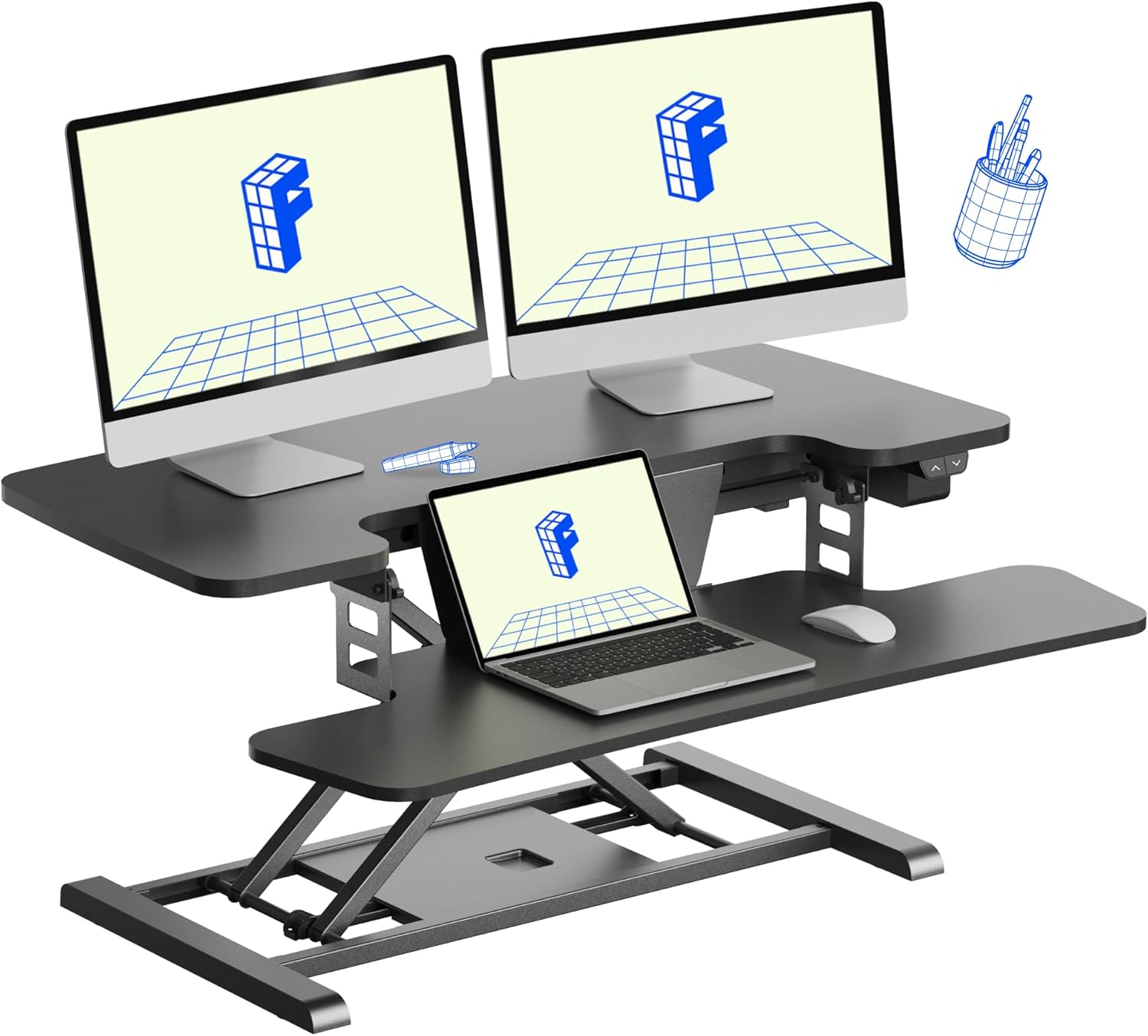
⚖️ #2 Best Value: FlexiSpot E5 (~$349)
★★★★★ 4.7/5 · Based on 4,100+ Amazon reviews
The FlexiSpot E5 is the sweet spot for most buyers. It shares the same dual-motor architecture as the E7 Pro at $150 less, sacrificing only weight capacity (220 lbs vs 355 lbs) and one memory preset. For a standard single or dual-monitor home office setup, this difference is irrelevant. The E5 consistently ranks as one of the best-selling standing desks on Amazon for good reason.
| ✅ PROS | ❌ CONS |
|---|---|
| Dual-motor stability at $100 less than E7 Pro | 220 lb limit (vs 355 lb on E7 Pro) |
| 4,100+ Amazon reviews — extremely proven | 3 memory presets (vs 4 on E7 Pro) |
| Multiple desktop sizes and colors | Anti-collision detection not as refined |
| Height range 22.8″–48.4″ — fits most heights | Wire management tray sold separately |
⚠️ One of the best-selling standing desks — stock can run low
💰 #3 Best Budget: VIVO Electric Standing Desk (~$249)

★★★★☆ 4.4/5 · Based on 6,500+ Amazon reviews
For under $250, the VIVO Electric Standing Desk delivers the core functionality you need: electric height adjustment, 3 memory presets, and a solid 154 lb capacity. It’s not as stable at maximum height as the FlexiSpot options, but for a budget entry into standing desks — especially for a single-monitor, lighter-duty setup — it’s hard to beat. Over 6,500 Amazon reviews confirm its reliability at this price point.
| ✅ PROS | ❌ CONS |
|---|---|
| Best price under $250 for a full electric desk | Single motor — less stable at full height |
| 6,500+ Amazon reviews — extremely well tested | 154 lb limit — not ideal for heavy multi-monitor rigs |
| Multiple size options (40″, 48″, 55″, 60″) | Motor is audible at 55dB — noticeable on calls |
🔇 #4 Quietest Motor: FEZIBO Electric Standing Desk (~$299)

★★★★☆ 4.5/5 · Based on 3,200+ Amazon reviews
The FEZIBO is the go-to choice if you’re frequently on video calls or in a shared space. Its dual-motor system runs at under 40dB — quieter than the FlexiSpot models — meaning you can adjust height without interrupting a meeting. It also comes with a built-in cable management tray and hook, solving the desk clutter problem right out of the box.
| ✅ PROS | ❌ CONS |
|---|---|
| Ultra-quiet at <40dB — adjust during calls | 180 lb limit — lower than FlexiSpot E5 |
| Cable management tray included | Desktop surface slightly thinner than competitors |
| 4 memory presets + USB charging port | Fewer size options than VIVO |
📐 #5 Best L-Shaped: FlexiSpot E1L (~$449)

★★★★☆ 4.5/5 · Based on 800+ Amazon reviews
If you need a corner desk setup, the FlexiSpot E1L is the only L-shaped electric standing desk under $500 worth considering. It provides an enormous 2-monitor-plus workspace and the same dual-motor FlexiSpot reliability. The L-shape creates a natural workflow zone separating primary work (monitor) from secondary tasks (writing, notes, or a laptop).
| ✅ PROS | ❌ CONS |
|---|---|
| Massive workspace — best for multi-monitor | Requires large room (60″x47″ minimum) |
| FlexiSpot dual-motor reliability | Complex assembly (2 people recommended) |
| Natural workflow separation in corner | More expensive than straight-desk counterparts |
🎮 #6 Best for Gaming/Streaming: Eureka Ergonomic I1-S (~$379)

★★★★☆ 4.4/5 · Based on 1,000+ Amazon reviews
The Eureka Ergonomic I1-S is designed for the creator who works and games at the same desk. It features a carbon fiber texture desktop, RGB lighting under the surface (controllable via app), and a built-in headphone hook and cup holder. Underneath the gaming aesthetic is a solid electric frame with a 176 lb capacity and 3 memory presets. A genuinely fun desk that doesn’t sacrifice functionality.
| ✅ PROS | ❌ CONS |
|---|---|
| RGB lighting + carbon fiber look | Aesthetic may not suit professional environments |
| Built-in headphone hook + cup holder | Single motor — less stable than FlexiSpot |
| Full gaming + work desk in one | 176 lb weight limit |
Comparison: All 6 Standing Desks
| Desk | Price | Rating | Motor | Capacity | Best For |
|---|---|---|---|---|---|
| FlexiSpot E7 Pro | ~$499 | ★★★★★ 4.8 | Dual | 355 lbs | Heavy setups |
| FlexiSpot E5 | ~$349 | ★★★★★ 4.7 | Dual | 220 lbs | Best value |
| VIVO Electric | ~$249 | ★★★★☆ 4.4 | Single | 154 lbs | Budget |
| FEZIBO | ~$299 | ★★★★☆ 4.5 | Dual | 180 lbs | Quiet motor |
| FlexiSpot E1L | ~$449 | ★★★★☆ 4.5 | Dual | 220 lbs | L-shape/corner |
| Eureka I1-S | ~$379 | ★★★★☆ 4.4 | Single | 176 lbs | Gaming/Streaming |
Our Verdict: Which Standing Desk Should You Buy?
For most people: The FlexiSpot E5 at ~$349 hits the sweet spot. Dual-motor stability, 4,100+ verified reviews, and a proven track record make it the safest buy in this category.
If budget is tight: The VIVO Electric Desk at ~$249 delivers the core standing desk experience. Just keep loads under 130 lbs for best stability.
Best premium pick: The FlexiSpot E7 Pro at ~$499 is the closest you’ll get to a $1,000 Uplift without the price. The 355 lb capacity and 15-year frame warranty make it a desk you’ll never need to replace. Research from the National Institutes of Health confirms alternating sitting and standing reduces fatigue and musculoskeletal discomfort — making this investment worthwhile for long-term health.
→ Best Ergonomic Chairs Under $300 — pair your desk with the right chair
→ Complete Home Office Setup Under $1,000 — every piece of gear you need
Frequently Asked Questions
Are standing desks worth it?
Yes — research published in the National Institutes of Health confirms that alternating between sitting and standing reduces fatigue, musculoskeletal discomfort, and improves focus. Workers who use standing desks report higher energy levels and fewer afternoon productivity slumps.
How long should you stand at a standing desk?
Occupational health experts recommend a 1:1 ratio — stand for 30 minutes, sit for 30 minutes. Aim for 2–4 total hours of standing during an 8-hour workday. Standing all day creates its own strain (varicose veins, knee issues), so balance is key.
What size standing desk do I need for dual monitors?
For a dual-monitor setup, a 60-inch minimum width is recommended. This gives you enough room for two 27″ monitors side by side plus keyboard and mouse space. All FlexiSpot models in this guide come in 60″ configurations.
Do cheap standing desks wobble?
Single-motor desks under $200 often wobble noticeably at maximum standing height with heavy loads. Dual-motor desks (FlexiSpot E5, E7 Pro, FEZIBO) are significantly more stable. If you’re using multiple monitors, always choose dual-motor.
Frequently Asked Questions
What is the best electric standing desk under $500?+
The FlexiSpot E7 Pro is the best electric standing desk under $500. Its reinforced steel oval legs, 355-lb weight capacity, and 15-year warranty make it exceptionally durable. The dual-motor is whisper-quiet at 45dB and the desk height range (22.8″–48.4″) accommodates virtually any user height.
How long should you stand at a standing desk per day?+
Research suggests alternating between sitting and standing every 30-60 minutes. A commonly recommended ratio is 1:1 to 3:1 sitting-to-standing. Starting with 1-2 hours of standing per day and gradually increasing is advisable. Standing too long without movement can cause its own fatigue and joint issues.
Do standing desks actually help with back pain?+
Yes — when used correctly. A 2011 study in the American Journal of Preventive Medicine found that alternating sitting and standing significantly reduced musculoskeletal discomfort. However, standing desks work best when paired with an anti-fatigue mat, proper monitor height, and regular movement breaks.
What height should a standing desk be set at?+
When standing, the desk surface should be at elbow height — elbows bent at 90 degrees with shoulders relaxed. For most people this is 40″–44″. A quick formula: standing height in inches × 0.47 gives your approximate ideal desk height. For sitting, your forearms should rest flat on the desk with no shoulder tension.
Are standing desks worth buying?+
For anyone who sits 6+ hours a day, a standing desk is one of the highest-ROI home office investments. The FlexiSpot E7 Pro at ~$480 amortizes to less than $7/month over its 5-year lifespan — far cheaper than chiropractic visits or lost productivity from chronic back pain.
How stable should a standing desk be?+
Stability is critical, especially if you use dual monitors. Look for desks with crossbeam support and oval or rectangular leg profiles (both more rigid than round tubes). The FlexiSpot E7 Pro’s oval legs and crossbeam virtually eliminate wobble at standing height — less stable desks like the VIVO show more lateral sway but are acceptable for lighter setups.
Home office enthusiast and founder of Home Office Nation. I’ve spent years optimizing my own workspace and have analyzed thousands of Amazon reviews, product specs, and user feedback to cut through the noise — so you can build a better home office without wasting money.
💡 Related Articles
Our Final Verdict
Whatever your budget or specific need, the right home office gear makes a measurable difference in your daily comfort and productivity. Each pick above was chosen for long-term reliability and real-world value.
As an Amazon Associate we earn from qualifying purchases.