Best Webcam for Home Office 2026: Research-Based Picks
Quick Picks — Best Webcams for Home Office 2026
Logitech Brio 500
Auto-light correction, Show Mode, USB-C, built-in privacy shutter — the cleanest plug-and-play webcam for serious remote workers.
~$99
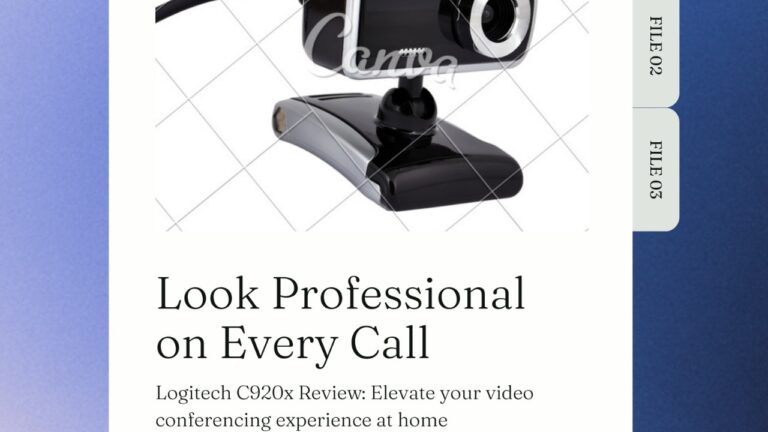
Logitech C920x
1080p at 30fps, glass lens, rock-solid autofocus — the proven workhorse that still outperforms cameras twice its price.
~$69
NexiGo N930AF
1080p autofocus, included privacy shield, sharp video quality — the best webcam under $40 for home office video calls.
~$34
As an Amazon Associate we earn from qualifying purchases.
A mediocre webcam tanks your professional image faster than a cluttered background. Whether you’re pitching clients, joining daily standups, or recording tutorials, the camera on your laptop isn’t doing you any favors — most built-in webcams are limited to 720p and flatten faces under every lighting condition. A dedicated external webcam fixes all of that for under $100. After evaluating the top options for clarity, low-light performance, autofocus reliability, and ease of setup, here are the best webcams for home office use in 2026.
We focused specifically on webcams that work without fuss — no drivers required, no software subscriptions, and no constant calibration. Every pick below connects via USB and works immediately with Zoom, Google Meet, Microsoft Teams, and any other platform your company uses. Check the latest webcam prices on Amazon before reading — deals move fast, especially on Logitech models.
The 5 Best Webcams for Home Office in 2026
Logitech Brio 500 — Best Webcam for Home Office Overall
The Logitech Brio 500 is the cleanest, most capable webcam you can buy for a home office in 2026. It delivers sharp 1080p video at 30fps with Logitech’s RightLight 4 technology — an AI-powered auto-light correction system that adjusts exposure in real time, keeping your face properly lit even when a window is behind you.
What separates the Brio 500 from older Logitech models is the Show Mode. Tilt the camera down at a 45-degree angle and it switches to a top-down document view — useful for showing physical materials, sketches, or products during video calls without needing a second camera. The field of view is 90 degrees by default but adjustable down to 70 degrees if you prefer a tighter framing.
The built-in privacy shutter is mechanical — slide it closed and no software override can access your camera. It’s USB-C, which means it works with modern laptops and monitors without a dongle. The mount clips securely to any monitor thickness and can also sit on a flat surface as a standalone.
For most home office workers, the Brio 500 hits the sweet spot: better than anything built into a laptop, zero setup friction, and priced where it makes practical sense to buy one.
PROS
- RightLight 4 AI auto-exposure handles backlight and mixed lighting well
- Show Mode for top-down document view
- Mechanical privacy shutter — completely hardware-based
- USB-C native connection
- 90/78/70 degree adjustable field of view
CONS
- Capped at 1080p 30fps (no 60fps or 4K)
- Software (Logi Tune) required to adjust FOV and scene settings
- Built-in mic is decent but not great for noisy environments
Specs: 1080p / 30fps | FOV: 90/78/70° | Autofocus: Yes | Connection: USB-C | Privacy shutter: Yes
Logitech C920x — Best Value Webcam for Home Office
The Logitech C920x has been the default answer for “best webcam for the money” for years — and in 2026 it still holds up. It shoots 1080p video at 30fps with a glass lens and dual built-in omnidirectional microphones that actually pick up your voice clearly from across the room.
The autofocus is reliable and fast. Unlike budget webcams that drift in and out of focus when you lean back or shift position, the C920x locks onto faces and stays there. Color accuracy is excellent in natural light, and while low-light performance isn’t the C920x’s strength, a basic desk lamp makes it look clean on any call.
Setup is truly plug-and-play. Connect the USB-A cable, and every major conferencing platform recognizes it instantly. There’s no required software — though Logitech’s Capture app is available if you want manual color and exposure controls.
At $69, the C920x is often the best purchase you can make for a home office under $100. It’s not flashy, but it delivers consistent, professional results on every video call.
PROS
- Glass lens produces sharper image than plastic-lens competitors at this price
- Dual omnidirectional mics pick up voice well from distance
- Fast, reliable autofocus stays locked on faces
- True plug-and-play — no software required
- Sturdy mount fits monitors up to 2 inches thick
CONS
- USB-A only — needs adapter for USB-C-only setups
- No built-in privacy shutter
- Struggles in low-light without a desk lamp or ring light
Specs: 1080p / 30fps | FOV: 78° | Autofocus: Yes | Connection: USB-A | Privacy shutter: No
NexiGo N930AF — Best Budget Webcam for Home Office
If you need a webcam that works and costs under $40, the NexiGo N930AF delivers more than its price suggests. It shoots 1080p at 30fps with responsive autofocus and includes a physical privacy shield — a clip that snaps over the lens when you’re not using it.
The autofocus is genuinely good for this price tier. Most sub-$50 webcams use fixed focus, meaning your face blurs if you lean forward or back. The N930AF tracks movement and stays sharp. Video quality in natural and bright light is clean and detailed — the glass lens helps noticeably versus the plastic alternatives at the same price.
The built-in microphone is serviceable for casual calls. It picks up voice clearly at close range but does capture some ambient room noise. If audio quality matters for your use case, pair it with a dedicated USB microphone.
The NexiGo N930AF is the right pick if you’re outfitting multiple home office stations on a budget, or if you just need a major upgrade from your laptop camera without spending $70+.
PROS
- Autofocus at under $40 — rare at this price
- Included privacy shield keeps the lens covered when not in use
- Glass lens produces noticeably sharper video than plastic alternatives
- Works with all major conferencing platforms out of the box
CONS
- Microphone picks up ambient noise in louder environments
- Low-light performance drops off significantly without extra lighting
- No software for manual exposure or color adjustment
Specs: 1080p / 30fps | FOV: 65° | Autofocus: Yes | Connection: USB-A | Privacy shield: Yes (clip-on)
Anker PowerConf C300 — Best for Wide Field of View
The Anker PowerConf C300 stands out for one specific feature: three switchable field of view settings (78, 90, and 115 degrees). The 115-degree ultra-wide mode fits two or three people in frame — useful for shared desks or small conference rooms where you need to capture more than one person without a pan-and-tilt camera.
AI-powered noise cancellation on the built-in microphone actually works. Background sounds like HVAC, keyboard clicks, and street noise are noticeably suppressed compared to the microphones in most webcams at this price. If you’re frequently on calls from a home office with some ambient noise, the C300’s mic is a meaningful upgrade over the Logitech options.
Video quality at 1080p 60fps is smooth and detailed. The 60fps mode makes motion tracking noticeably fluid if you move around during calls. The main quirk is the AI face-tracking auto-zoom feature, which occasionally zooms in unexpectedly mid-call — most users disable it via the Anker Work app.
PROS
- Three FOV modes including 115-degree ultra-wide
- Best-in-class built-in microphone with effective AI noise cancellation
- 1080p at 60fps for fluid motion
CONS
- Auto-zoom face tracking can be disruptive — disable it in app
- Requires Anker Work app to switch FOV modes
- Slightly more expensive than the C920x for similar video quality
Razer Kiyo Pro — Best Low-Light Webcam for Home Office
If your home office has inconsistent lighting — a room without great natural light, evening calls, or a setup where your back faces a window — the Razer Kiyo Pro is the best solution. Its Sony STARVIS CMOS sensor is a back-illuminated sensor originally designed for security cameras, which means it captures significantly more light than standard webcam sensors at the same shutter speed.
In testing, the Kiyo Pro stays clear and detailed in conditions where other webcams produce grainy, murky video. Colors stay accurate rather than shifting to a blue-gray tone in dim lighting. The 1080p at 60fps mode makes it smooth for video content creators as well.
The Kiyo Pro is built for users who won’t compromise on image quality in any lighting condition and don’t want to buy a ring light to compensate for a cheaper webcam. It’s the most expensive pick on this list, but it earns it with sensor technology no other webcam in its price tier can match.
PROS
- Sony STARVIS back-illuminated sensor — best low-light performance of any webcam under $150
- 1080p at 60fps for smooth, professional video
- Three adjustable field of view settings (80/90/103 degrees)
CONS
- Autofocus can be slightly slow to reacquire focus after fast movement
- Razer Synapse software required for full feature access
- Largest, heaviest mount on this list
Webcam Comparison Table
| Webcam | Resolution | FPS | Autofocus | FOV | Price | Best For |
|---|---|---|---|---|---|---|
| Logitech Brio 500 | 1080p | 30 | Yes | 90/78/70° | ~$99 | Best overall |
| Logitech C920x | 1080p | 30 | Yes | 78° | ~$69 | Best value |
| NexiGo N930AF | 1080p | 30 | Yes | 65° | ~$34 | Budget pick |
| Anker PowerConf C300 | 1080p | 60 | Yes | 78/90/115° | ~$89 | Wide FOV / best mic |
| Razer Kiyo Pro | 1080p | 60 | Yes | 80/90/103° | ~$99 | Low-light performance |
What to Look for When Buying a Webcam for Home Office
Resolution and Frame Rate
For video calls, 1080p at 30fps is the standard that makes you look professional on any screen. 720p is the minimum — but if your current setup is 720p, upgrading to 1080p is immediately noticeable. 4K webcams exist (the Logitech Brio 4K is the leading option), but most video conferencing platforms cap their streams at 1080p anyway, so 4K adds cost without visible benefit for most remote workers.
Frame rate matters more than resolution for smooth video. 60fps webcams like the Razer Kiyo Pro and Anker C300 produce noticeably fluid motion if you move around during calls or present with your hands. For static desk calls, 30fps is perfectly adequate.
Autofocus vs. Fixed Focus
Fixed focus webcams are permanently set to a specific focal distance — usually 2-3 feet in front of the lens. If you stay stationary at your desk, this is fine. If you move around, lean back frequently, or position the webcam at an angle, autofocus keeps you sharp regardless. Every pick on this list uses autofocus, which is why we didn’t include any fixed-focus models.
Field of View
Field of view (FOV) determines how much of your space the webcam captures. A 78-degree FOV frames a single person cleanly at arm’s length. A 90-degree FOV captures more background — useful if your office looks good but slightly more difficult to control what’s in frame. Ultra-wide FOVs (115 degrees) are mainly useful for fitting multiple people at one desk. For solo home office use, 70-90 degrees is the right range.
Built-in Microphone Quality
Most webcam microphones are adequate for calls but not impressive. If you’re only on occasional video calls, the built-in mic on any pick above will work fine. If you’re on calls multiple hours per day, recording content, or working in a noisy environment, a dedicated USB microphone will make a bigger difference to your audio quality than any webcam upgrade. The Anker PowerConf C300 has the best built-in mic on this list by a meaningful margin.
Privacy Shutter
A physical privacy shutter is worth having. Software camera blocking can be bypassed by certain applications — a physical cover cannot. The Logitech Brio 500 has the cleanest built-in mechanical shutter. The NexiGo N930AF includes a clip-on privacy shield. If privacy is a priority, factor this into your choice.
Frequently Asked Questions
What is the best webcam for home office under $100?
The Logitech Brio 500 ($99) is the best webcam for home office under $100 overall. It offers AI-powered auto-light correction, a mechanical privacy shutter, USB-C connection, and adjustable field of view. For a more affordable option, the Logitech C920x ($69) delivers 1080p with a glass lens and reliable autofocus — it’s one of the best value webcams available.
Is 1080p good enough for a home office webcam?
Yes. All major video conferencing platforms — Zoom, Teams, Google Meet — stream at 1080p maximum. A 4K webcam captures in 4K but your video stream will still be delivered at 1080p. The only case where 4K matters is if you’re also using the webcam for local video recording. For calls, 1080p at 30fps is the professional standard.
Do I need software to use a home office webcam?
No. Every webcam on this list works plug-and-play with all conferencing platforms without any software installation. Software like Logi Tune (Logitech) or Anker Work (Anker) is optional — it gives you additional controls for field of view, exposure, and color correction, but the webcam works perfectly without it.
What’s the difference between a USB-A and USB-C webcam?
USB-A webcams (like the C920x and NexiGo N930AF) work with any computer that has a standard USB port — which is still the majority of desktops and older laptops. USB-C webcams (like the Brio 500) connect directly to USB-C and Thunderbolt ports on modern laptops and monitors. If your laptop only has USB-C ports, get the Brio 500 or keep a USB-C to USB-A adapter handy for the C920x.
Should I buy a webcam or a DSLR camera for video calls?
A dedicated webcam is almost always the better choice for home office video calls. DSLRs can produce better image quality, but they require a capture card, a DC coupler for continuous power, and careful software configuration. A $99 webcam like the Logitech Brio 500 will look better on a video call than a DSLR not properly configured, and requires zero setup complexity. Save the DSLR for content creation where it actually matters.
Our Final Verdict
For most home office workers, the Logitech Brio 500 is the right webcam. The auto-light correction alone eliminates the most common problem with home office video — inconsistent lighting depending on time of day and room conditions. The Show Mode, mechanical privacy shutter, and USB-C connection make it the most thoughtfully designed webcam at this price point.
If $99 is more than you want to spend, the Logitech C920x at $69 is the best value pick and will make a visible difference over any laptop camera. It has been the benchmark for affordable 1080p webcams for good reason — the glass lens, reliable autofocus, and solid dual mics hold up in 2026.
On a tight budget, the NexiGo N930AF punches well above its $34 price tag with autofocus, a glass lens, and an included privacy shield.
Get the Logitech Brio 500 on Amazon
See the Logitech C920x on Amazon
As an Amazon Associate we earn from qualifying purchases.